Product

Fourteen surfaces. One desk.

Foreman is built around the way a hardware dealer actually works, not around a generic sales pipeline. Every tab in the cockpit is here, starting with the one that answers questions about the whole business.

  • Reads your email and your QuickBooks
  • Drafts the reply, a person sends it
  • Ask it anything, on hardware we own
01 · Ask

A conversational AI over your entire business, on hardware we own.

Every competitor leads with an assistant. Theirs runs on OpenAI's servers with your customer list sitting in the prompt. This one runs in Nashville on machines Oluri owns, and it has real tools rather than a chat window bolted to a help page.

What you can ask it

  • What is my live margin on this part.
  • Trace a serial back to the vendor and the PO it came in on.
  • Pull up any past order with its serials, conditions and photos.
  • What has this part actually sold for, out of QuickBooks.
  • What is this customer's balance.
  • Find me deals worth buying. Who is looking for this part.

What it will prepare for you

  • A quote.
  • A purchase order.
  • A shipping label.
  • An inventory adjustment.
  • A reply to a customer.

All of it stops at one tap. Ask prepares; a person confirms. It never sends and never commits on its own.

Order recall in plain language. You can type it the way you would say it. "Trifecta is having defects on the SFP-10G-SR we sent them last week" comes back with the order, its serials, conditions, authenticity verdicts, the photos taken at receiving and at packing, the tracking number, your invoice number, their PO number and the Record of Origin sheet. If more than one order matches, it asks which one rather than guessing, because an RMA credited to the wrong order sends a replacement against the wrong unit.

02 · Desk

Conversations, not a mailbox.

Every customer email thread shows up as a live conversation with a state, instead of as unread mail you have to re-read to remember. The desk sorts itself by the only question that matters at 8am: is this one waiting on me, or waiting on them?

  • Waiting on you versus waiting on them, split out and counted.
  • The whole thread history in one place, including what was quoted and at what price.
  • Nothing gets buried because it arrived at 11pm underneath a vendor blast.
Product screenshot Desk: customer threads split into waiting on you and waiting on them.

03 · Inbox

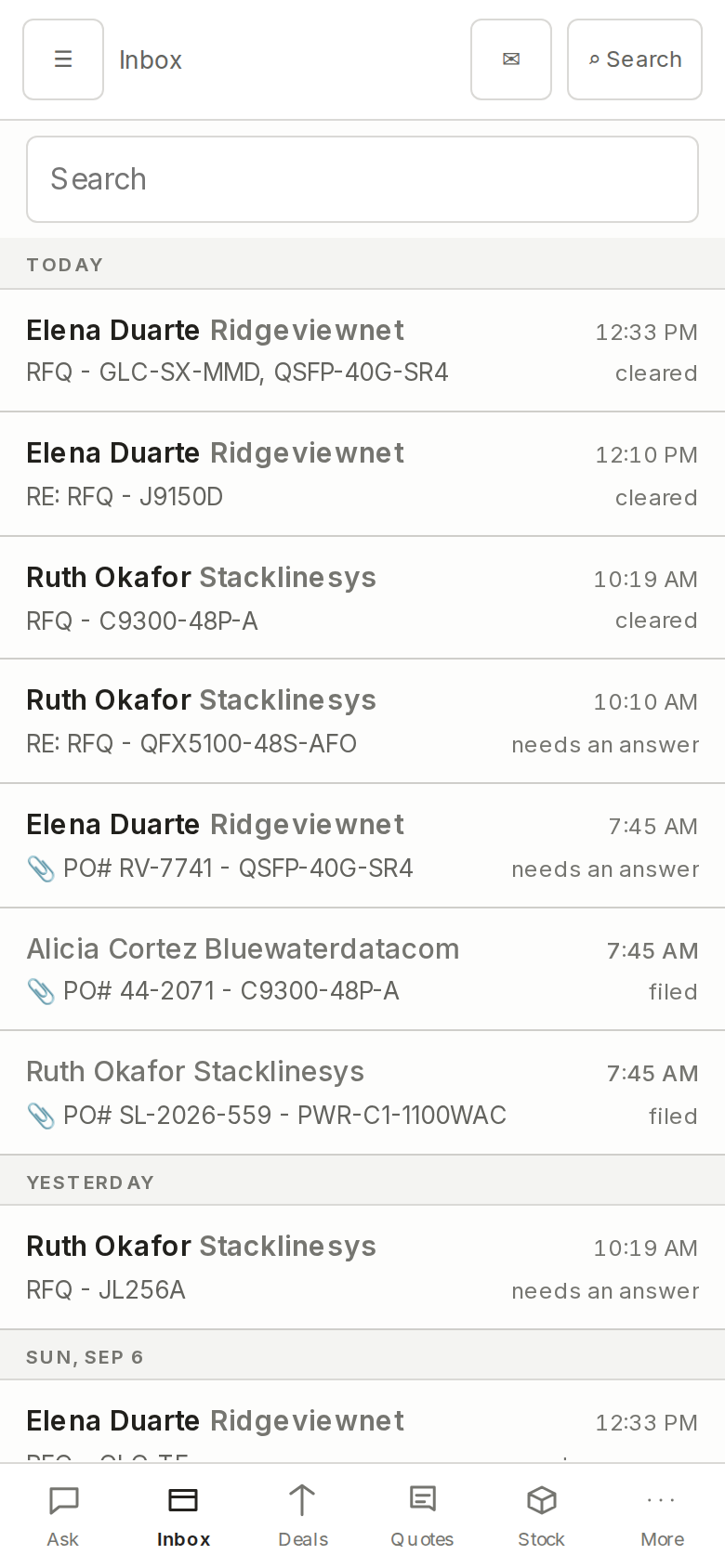
The whole mailbox, inside the product.

A full mail reader sits in the cockpit, so working a thread never means alt-tabbing back to Outlook and losing the deal context you were holding. Everything Foreman knows about the customer, the part and the past order is on the same screen as the message.


04 · Quoting

Grouped by whether you can actually fill it.

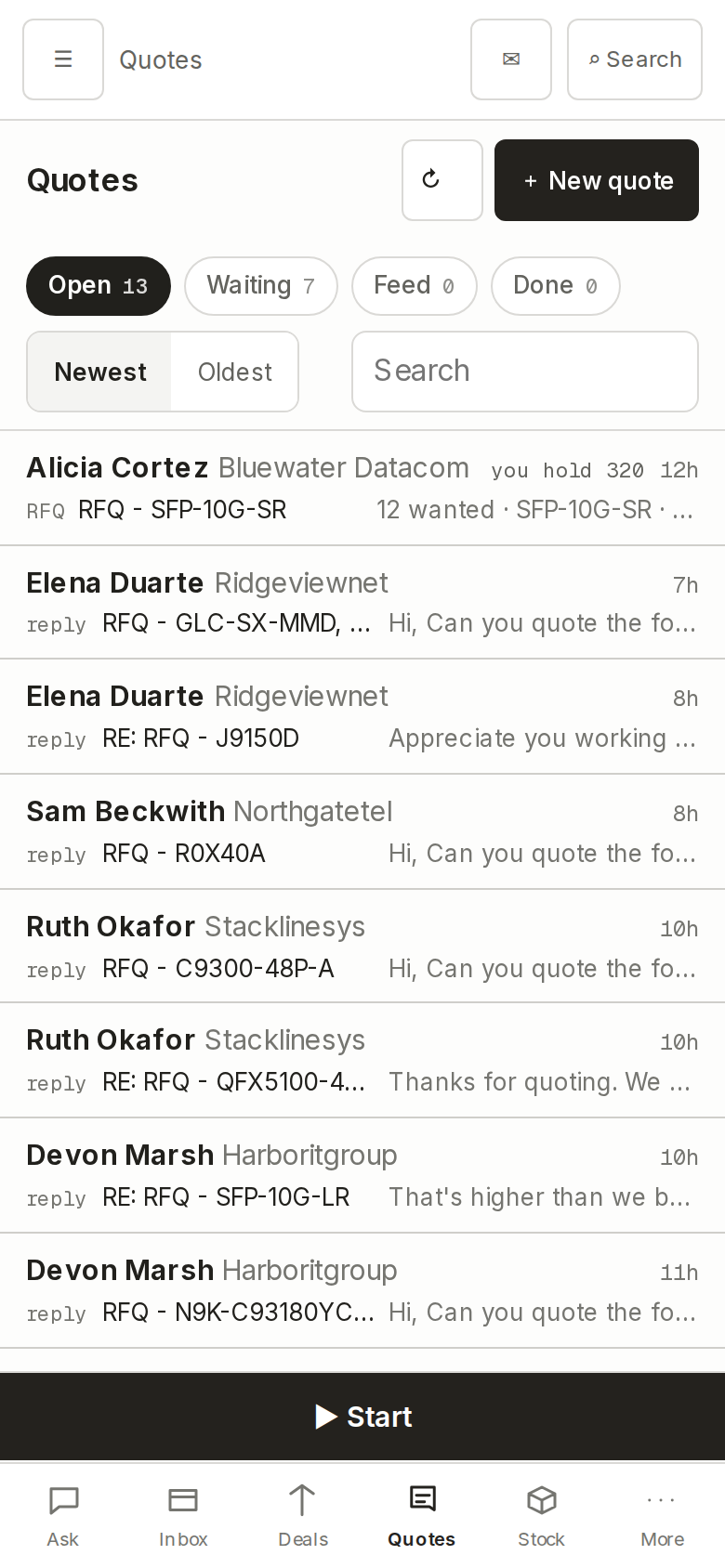
Incoming requests for quote get pulled out of the mail and sorted by the thing that decides what you do next. Not by date, not by customer name. By fillability.

  • In stock. You have all of it, on the shelf, right now.
  • Have some, short the rest. Partial fill, and it tells you what's missing.
  • Need to source. Nothing on hand, so it goes to Sourcing.
  • No such part. The number does not resolve to anything real, which usually means a typo in their RFQ.

Then it drafts the reply and prices it. Not off a list price and not off an ask: the suggestion is anchored on recent comparable sales, weighted by how recent and how large, and weighted again by your own historical markup on that part with the human reason attached to each past quote. Dealer-board pricing is used as an ask-weighted ceiling for reference, never as what you would pay.

Grades never blend. New, new-bulk, refurb and used are separate items with separate price histories, so a refurb sale can't quietly drag down what you think new is worth.

Product screenshot Quoting: RFQs grouped in stock, short, need to source, no such part.

05 · Quotes out

It holds the whole negotiation, not just the first number.

A quote is rarely one message. "Can you do $2,100?" "Actually I need 50, not 10." "Is that new or refurb?" "When does it ship?" Foreman reads the full back and forth, decides the move inside a policy fence you set, and drafts the next reply.

  • Multi-turn. It keeps the thread's history, not just the last message.
  • It moves inside limits you set, and it never sends.
  • Lost-at-price. When a deal goes away, the thread usually contains the number you lost at. "Too high, they got it for 420." That gets captured as a real ceiling on where you needed to be. No ERP can do this, because none of them read the thread.
Why it matters

You find out what you were actually bidding against.

Most desks know which quotes they won. Very few know the number that beat them, because it lives in a sentence halfway down an email nobody logged. Over a year that turns into a real picture of where your pricing is soft.


06 · Deals

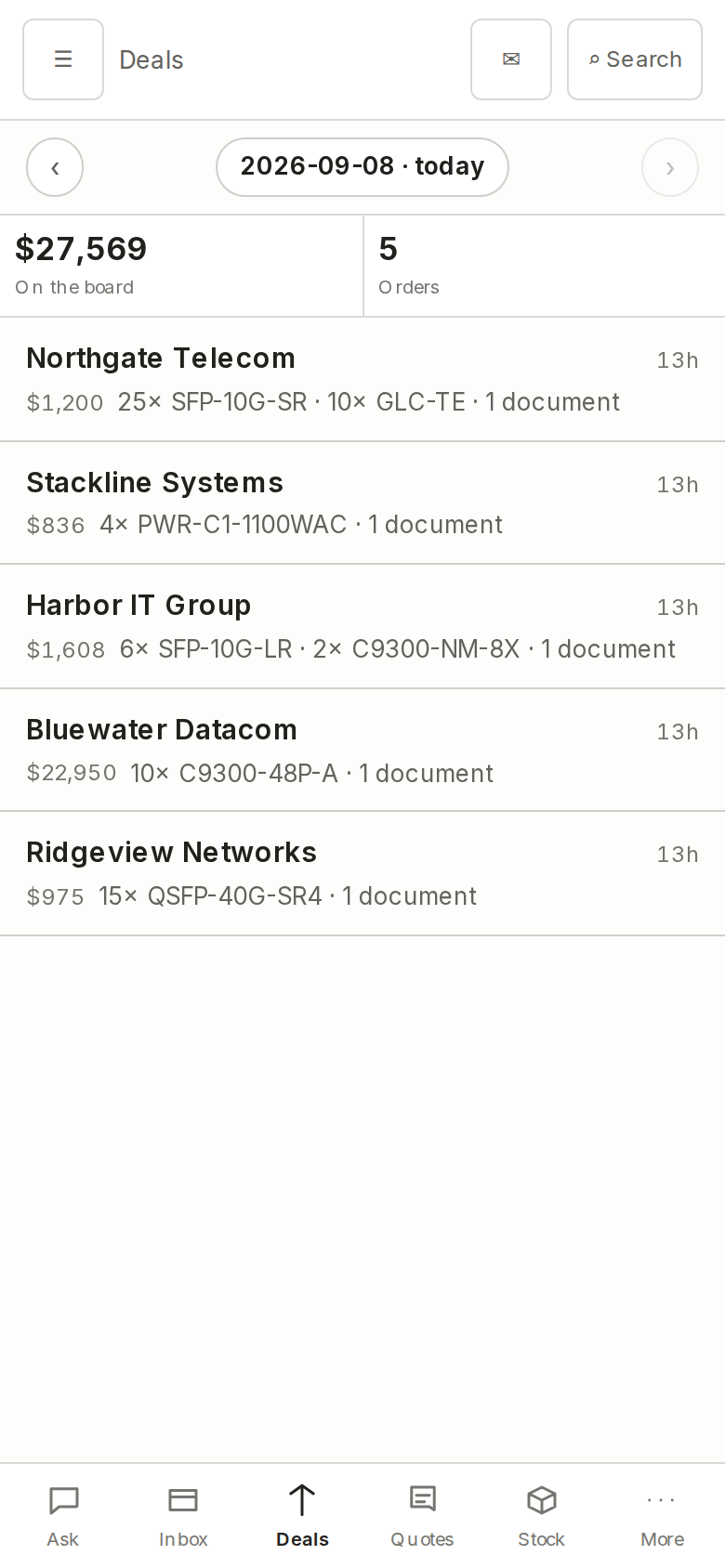
Confirmed orders only, lifted out of the inbox.

A quote is not a deal. Deals holds the orders a customer has actually confirmed, pulled out of email automatically, including the PO number read off the PDF attachment their system generated.

  • PO numbers extracted from PDF attachments in whatever format they arrive in.
  • Tracks what has shipped, what has been invoiced and what is still open.
  • No more folder of purchase orders waiting for the one person who knows what to do with them.
  • Three-way match. The customer's PO document, what Foreman parsed out of it, and what you actually invoiced are compared against each other. A bad parse that somebody quietly corrected in QuickBooks can't hide behind money that looks right.
  • Realized margin. What you actually made on the closed sale, not just whether you won it.
Product screenshot Deals: confirmed orders with PO numbers pulled from PDF attachments.

Authenticity and provenance

Counterfeit Cisco is the thing your buyer is actually afraid of.

It is the number one risk in this trade and the number one question behind every large order. Today the answer lives in the owner's head and his reputation. Foreman turns it into an artifact you can hand the customer.

Every unit gets a verdict

Authenticity checking

A per-SKU reference library of authentic units and known fakes, run through a hybrid inspector: barcode, deterministic rules, reference-image comparison and a vision model. Every received unit comes out the other side with a verdict attached to its serial.

Per order

Record of Origin

A stored document covering every serialised unit on the order: which vendor it came from, which PO, the date it was received, the authenticity verdict, and the photograph taken of that exact serial the day it landed. There is a customer-safe version that does not name your supplier, which is the first thing a dealer asks.

Before the tape goes on

Pack verify

The serials in the box are checked against the serials on the order. It catches a wrong unit, and it will not let a unit flagged suspect leave the building. Competitors sell barcode pack verification. None of them hold an authenticity verdict per unit, so none of them can stop a counterfeit at the door.

Who you buy from

Vendor trust

Sourcing results carry a trust rating per listing that blends marketplace seller reputation with your own authenticity history with that vendor. Risky ones get flagged or vetoed. It recommends the safest good-margin source, not blindly the cheapest.

You stop saying "trust me." You hand them the sheet.


07 · Inventory

What's on the shelf, and what it's really worth.

Four numbers per line, kept current: what you have, what it cost you, what it is worth in the market today, and how long it has been sitting there. Aging stock is the quietest way a dealer loses money, so it is on the screen instead of in a spreadsheet nobody opens.

  • On-hand quantity tied to your QuickBooks items and inventory.
  • Real landed cost from the bill it came in on.
  • Current market value from listings across the trade.
  • Age on the shelf, so slow movers stop hiding.
Product screenshot Inventory: on hand, cost, current market value and age.

08 · Purchasing

Purchase orders out to your vendors.

The buy side of the paperwork. POs raised against what you need, tracked until the boxes land, and matched to what actually shows up when Receiving opens them.


09 · Receiving

The half that usually gets done on a clipboard.

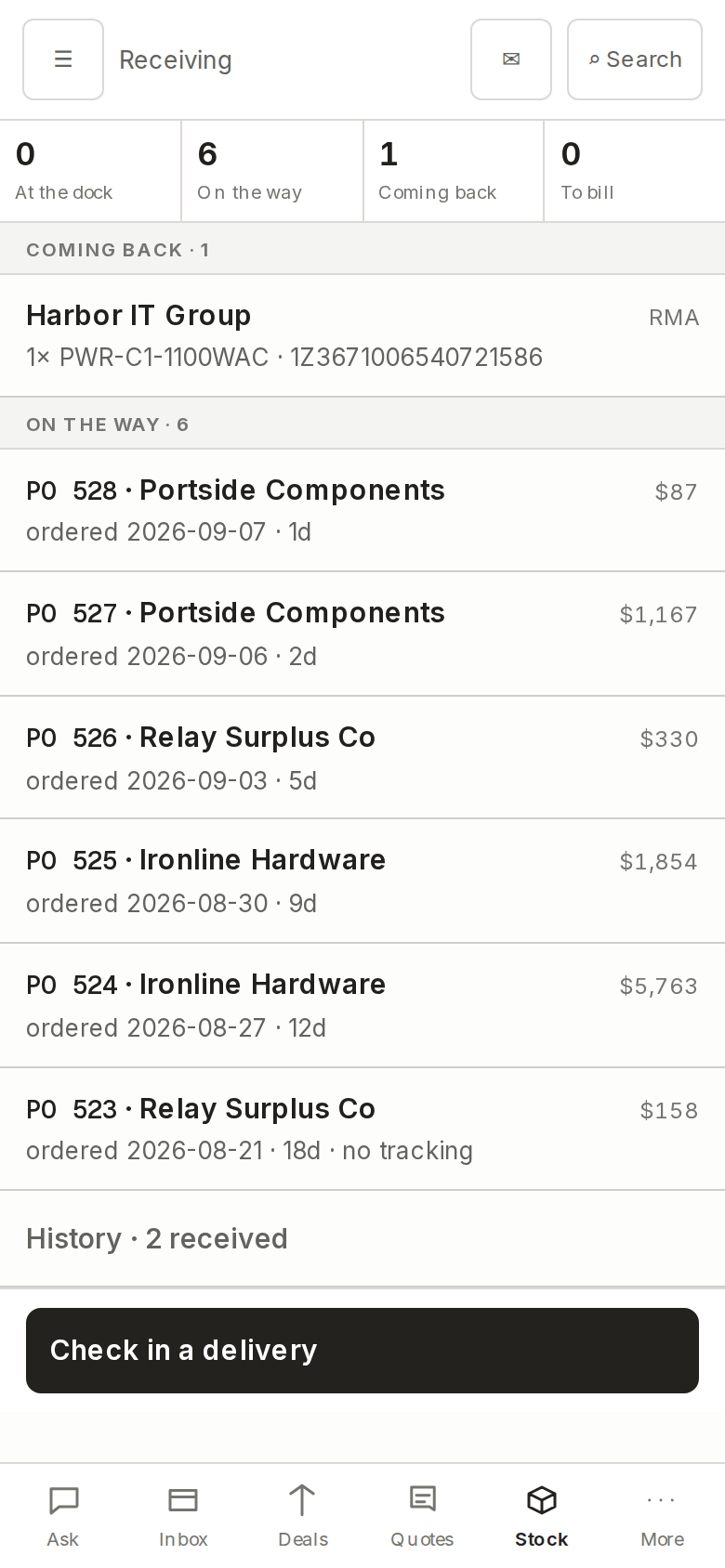
Receiving the boxes against the open PO, and capturing serial numbers as they come off the pallet. This is where a unit's whole history starts, so it is where the authenticity verdict and the photograph get attached.

  • Receive against the open PO, so short shipments show up as short shipments.
  • Serial number capture, including reading serials from photographs. Point a phone at the label instead of typing it twice.
  • What is received flows into Inventory with its real cost attached.
  • A photograph of the actual unit is captured at receiving, kept, and can be pulled back later and attached to a customer reply. Foreman will never claim a photo it does not have.
  • The serial ledger. A serial's whole life is tracked, inbound and outbound. "The switch you sent me, serial FOC1234, is dead. Where did it come from?" is one lookup instead of a person digging through invoices.
  • Returns and RMA sit on that ledger. A returned serial re-opens the existing unit's lifecycle. It does not mint a new row, which is exactly how a return silently doubles stock in other systems.
Product screenshot Receiving: matching a delivery to an open PO with serial capture.

10 · Shipping

Live carrier truth, not a snapshot from label time.

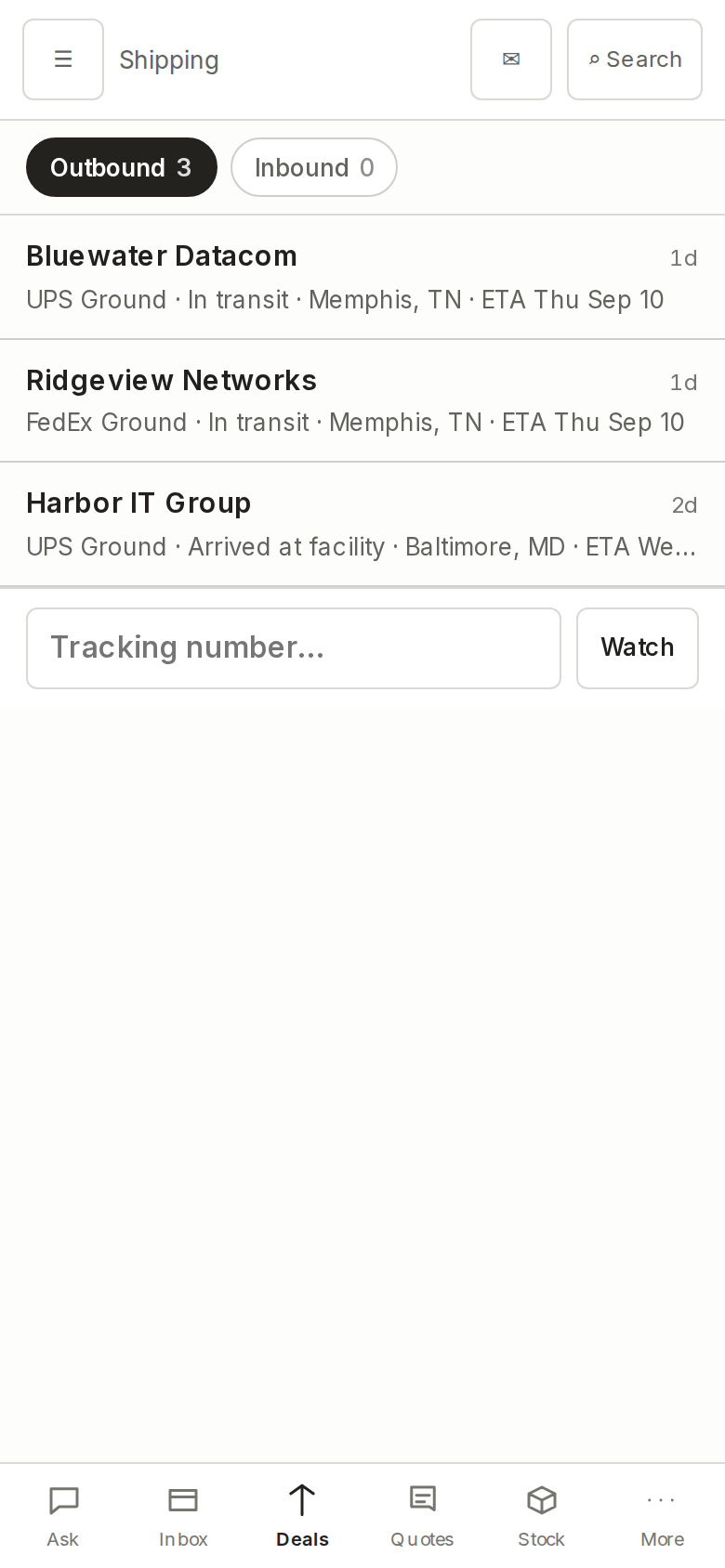
Foreman talks to UPS and FedEx on your own carrier accounts and keeps asking. What is genuinely in transit, what delivered, and what has an exception sitting on it that nobody has looked at yet.

  • Rates, labels and tracking on your accounts and your negotiated rates.
  • Exceptions surfaced instead of discovered when the customer calls.
  • Tied back to the deal and the PO, so shipping status is order status.
  • Multi-warehouse. Pick the ship-from per shipment, and the fulfilling warehouse is stamped onto the invoice.
  • International. Commercial invoices for customs, multi-currency, and the importer of record handled as its own party separate from the consignee. That last one is the usual reason a forwarder shipment gets rejected.
Product screenshot Shipping: in transit, delivered and exceptioned, live from the carriers.

11 · Trade

The Spread Desk. Buying as an active desk, not a search box.

Most software makes you go looking. Trade hunts for you, against the two things that actually decide whether a buy is smart: what you sell fast, and what you are low on.

  • Works eBay and BrokerBin against your real sales velocity and your current holes.
  • Compares live buy prices to your own real sell prices, not to a list.
  • Surfaces every find that clears the margin floor you set, and leaves the rest alone.
The difference

A search box waits. A desk works.

The margin in this trade is made on the buy at least as often as on the sell. Trade treats it that way: it is looking while you are doing something else, and it only interrupts you when the spread is real.


12 · Sourcing

Find the part, and catch the underpriced stock.

When you have to buy it before you can sell it, Foreman looks across dealer marketplaces and industry listings for the part and what it is going for. It also works the other direction: flagging stock listed below what it is worth, which is where a lot of a broker's margin actually comes from.

  • Finds parts you need to buy, with market pricing across the trade.
  • Flags underpriced listings worth grabbing.
  • Feeds the same pricing back into Quoting so your number is grounded.
  • Every listing carries a vendor trust rating built from marketplace reputation and your own authenticity history with that seller. The safest good-margin source wins, not the cheapest one.
Product screenshot Sourcing: a part search with market pricing across the trade.

13 · Agents

A fleet of working agents on the desk.

Not one assistant answering questions. A set of agents each working its own corner of the desk, all of them draft-only. They prepare; your people approve. The floor does not move.


14 · Autopilot

You decide how long the leash is.

Autopilot is where you say what Foreman may do on its own and what it has to bring to a person first. There is no setting that lets it email your customers by itself, and there is no setting that lets it move money. That floor does not move.

Autonomy is earned, not configured. A reply type's limit only rises when its own track record justifies it, and only when a human taps to accept the increase. Foreman never promotes itself. Most software hands you a permissions grid on day one and asks you to guess; this asks you to decide once there is evidence.

  • Per-action control over what runs unattended and what waits for approval.
  • Team roles: who can quote, who can approve, who can see the money.
  • Who sees what is a switch. Everyone sees everything, which is the default, or each salesperson sees only their own quotes and deals. Owners always see all of it.
Product screenshot Autopilot: per-action automation controls and team visibility.

The daily brief

Twice a day, the desk tells you what it found.

Standing watchers run against the whole business and land as a brief at 6pm and again at 7am. Not a digest of everything that happened. A short list of the things that will cost you money if nobody looks.

What they watch

Money going stale

Overdue receivables, purchase orders sitting unshipped on a vendor's dock, and quotes that have gone quiet.

What they catch

Below-cost and counterfeit

A customer PO priced under your own cost basis fires the minute it lands. Counterfeit flags do the same, before the unit moves.

It learns your desk

A weekly loop

Your own accumulated decisions become proposed pricing refinements for you to approve. It reads only. It never edits the money path and it never trains on its own.


Settings

Company, team, billing, connections.

Your company profile, the people on it and what role each one has, your billing, and the connections out to QuickBooks Online, your Microsoft 365 or Google Workspace mailbox, and your UPS and FedEx accounts. Every connection can be disconnected from here. See exactly what each connection reads and writes.

Two things live here that most desks do not need and some cannot do without, both off by default: service and labour charges, and consignment stock you hold but do not own.

The fastest way to judge it is to see it on your own parts.

Bring a real RFQ and a real PO. Fifteen minutes.